
Before I found WordPress, I tried different solutions for getting my business on the web.
I went through a Dreamweaver stage, an iWeb stage (that was an Apple product), and a use-the-website-creator-your-webhost-offers stage.
At least I had something to show for my efforts.
But it wasn’t much. And my options for customizing those websites were limited. Then, in late 2009, I was introduced to WordPress. And I’m such a fan, I co-created a product that’s a step-by-step course about WordPress.
One of the best features of WordPress are the built-in widgets. Once you’ve mastered widgets, you’ll have the ability to add all sorts of cool functionality to your website.
What are widgets?
WordPress widgets are delightful little containers for just about anything you’d like to add to your website that’s not the standard fare which appears on a post or a page.
Widget locations will vary by theme, but typically you’ll find them in:
- The header area of a website, often on the right side of the header
- The sidebar area
- The footer area
WordPress has many widgets available right out of the box.
If you use the Genesis Framework, like I do, you’ll have access to quite a few widgets that have been designed exclusively for the framework. Here’s a complete list of available Genesis Framework widgets.
How can you use widgets on your website?
Some widgets are pre-built and simply need to be dragged into place wherever you’d like to use them. Let’s take a look at the WordPress Popular Posts widget, for example.
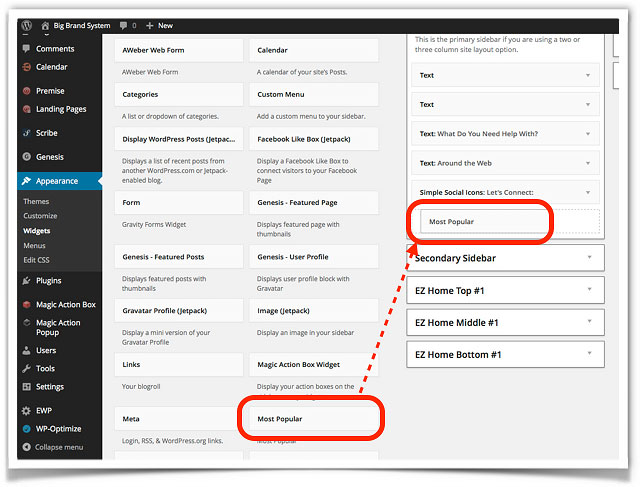
To use Popular Posts, simply grab it from the Available Widgets column, and drag it over the section where we want it to appear on our website.
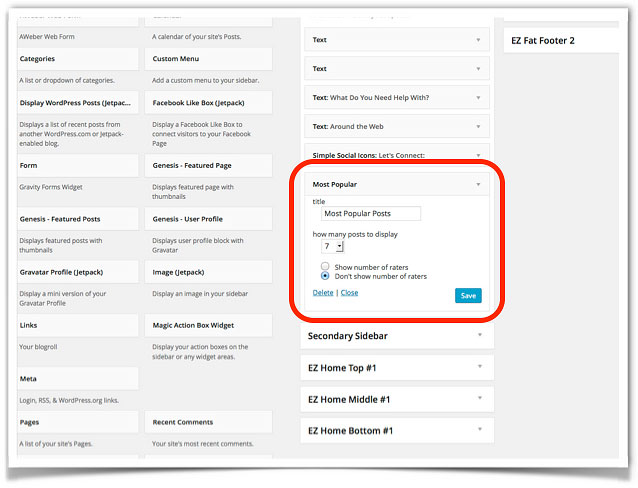
Once it’s in place, click on the down arrow to see the options that are built into the widget. This one asks you to fill out how many posts you want to show, and whether to show how many people rated the post.
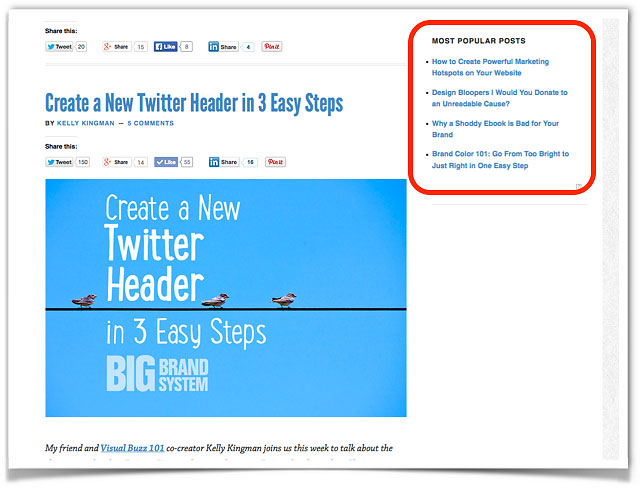
Once you fill out this information and save it, you’ll see the widget appear on the pages of your site.
To take a look at your widgets before making them live, go to Appearance > Customize, and preview your site.
Want to learn more about widgets?
There’s a lot more to know about widgets, and it’s easiest to show you how to use them with a live demonstration.
That’s why Wendy Cholbi and I got together to bring you a webinar that shows you how to make the most of the mighty widget.
It’s free, fast-moving, and fun.
To watch this — and all the other Brown Bag Webinars — click the button below.


![Marketing strategy's not working? Here's how to identify the weak link. [Image of a chain with a single link that's a paperclip, black and white on a green background.]](https://www.pamelawilson.com/wp-content/uploads/2025/01/marketing-strategys-not-working-768x396.jpg)


